ReturnSort by: Last reply / Newest / Most replies / Trending
v0.1.2 Flicker test bash script: This bash script uses the lossless animated Webp to create a loop to compare Webp and JXL to each other and a source PNG. The Webp/JXL filenames are…
v0.1.2 Flicker test bash script
This bash script uses the lossless animated Webp to create a loop to compare Webp and JXL to each other and a source PNG.
The Webp/JXL filenames are overlaid to display hidden info (ie filesize/CVVDP score/encoding parameters).
sRGB signaling is enforced for all images and finally temporary PNG intermediate files are deleted.Dependencies: FFmpeg, libwebp, and libjxl#!/usr/bin/env bash for f in in.png; do ffmpeg -hide_banner -loglevel error -color_primaries bt709 -color_trc iec61966-2-1 -i "$f" \ -vf "format=rgb24,drawtext=text='$(basename "$f")':fontcolor=white:fontsize=12:box=1:boxcolor=black@0.6:boxborderw=8:x=20:y=20" \ -pix_fmt rgb24 png.png done for f in *.webp; do dwebp -quiet "$f" -o decwebp.png ffmpeg -hide_banner -loglevel error -color_primaries bt709 -color_trc iec61966-2-1 -i decwebp.png \ -vf "drawtext=text='$(basename "$f")':fontcolor=white:fontsize=12:box=1:boxcolor=black@0.6:boxborderw=8:x=(w-text_w)/2:y=20" \ -pix_fmt rgb24 webp.png done for f in *.jxl; do djxl "$f" decjxl.png --quiet ffmpeg -hide_banner -loglevel error -color_primaries bt709 -color_trc iec61966-2-1 -i decjxl.png \ -vf "format=rgb24,drawtext=text='$(basename "$f")':fontcolor=white:fontsize=12:box=1:boxcolor=black@0.6:boxborderw=8:x=w-text_w-20:y=20" \ -pix_fmt rgb24 jxl.png done img2webp -lossless -m 6 -loop 0 -d 1000 png.png webp.png jxl.png -o Webp-vs-JXL_flicker.webp rm -f png.png decwebp.png webp.png decjxl.png jxl.png

/twg/ - Tech Workers General: Late Summer Edition
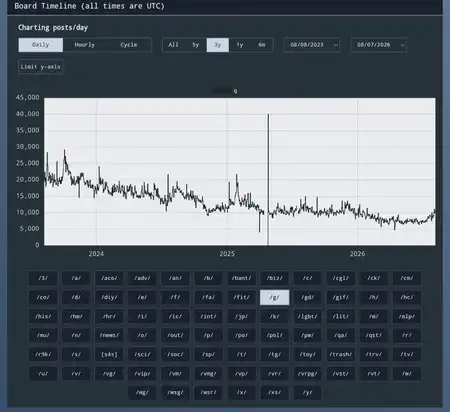
/g/ waiting room for umigalaxy or place to discuss the creation of a new altchan that has a dedicated AI board. I am fucking sick of the non-stop AI…
/g/ waiting room for umigalaxy or place to discuss the creation of a new altchan that has a dedicated AI board.
I am fucking sick of the non-stop AI spam shit and will no longer take it.

Enshittification: >bought a samsung smart TV to use as PC monitor >it works great >a firmware update later, the TV now loads on the fucking samsung TV crap when it tur…
Enshittification
>bought a samsung smart TV to use as PC monitor
>it works great
>a firmware update later, the TV now loads on the fucking samsung TV crap when it turns on
>another firmware update later, the they added another ad slot when I open the menu
Fucking hell

Gentoo Setups: Any Gentoo users here? I'm curious to hear what setups do you people have
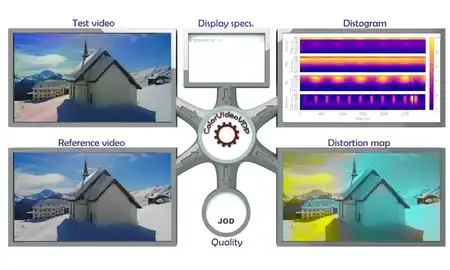
v0.0.9 image codec CVVDP bash script: https://files.catbox.moe/auw8e7.txt Primary goal: Determine compression efficiency between image codecs using a CVVDP score. Secondary goal: Investig…
v0.0.9 image codec CVVDP bash script
https://files.catbox.moe/auw8e7.txt
Primary goal: Determine compression efficiency between image codecs using a CVVDP score.
Secondary goal: Investigate diminishing returns between Webp and JXL
Currently only works with this specific input file: in.png. Only tested in Ubuntu WSL.
Replace /mnt/c/Users/1337/AppData/Local/Programs/Python/Python313/Scripts/cvvdp.exe with your CVVDP location.
CVVDP SDR display model used: standard_fhd. Scores tested: ~9.0 and ~9.5
My subjective CVVDP interpretation is that ~9.0 = medium quality and ~9.5 = high quality
Use CVVDP with photographic images only as it does poorly with Anime ones.
The display I'm using is a 27 inch 1080p monitor (~82 PPI), viewing distance is ~20 inches.
Created 9-20-2026, using the following dependents and their parameters:
ColorVideoVDP v0.5.7 (released on 08-02-2026) cvvdp -t out.png -r in.png --device cpu -d standard_fhd -m cvvdp
CJPEG version 6b (released on 03-27-1998) cjpeg -baseline -sample 1x1,1x1,1x1 -quality X in.ppm > out.jpg
libwebp v1.6.0 (released on 06-30-2025) cwebp -m 6 -af -q X in.png -o out.webp
libjxl v0.12.0 (released on 07-01-2026) cjxl in.png out.jxl -e 10 --override_bitdepth=10 -q X
libavif v1.4.2 (released on 05-26-2026) avifenc -y 420 -d 10 -s 4 -q X in.png out.avif
ffmpeg version N-125350-g3f6bf150cb-20260629
12 photographic wikipedia images being tested, resized to 50% PNGs, attribution provided in zip:
https://files.catbox.moe/te69tk.zip
https://files.catbox.moe/auw8e7.txt
Example Ubuntu WSL shell output:JPG CVVDP= 9.54 Fsize= 178.7 KB [ cjpeg -baseline -sample 1x1,1x1,1x1 -quality 55 ] Webp CVVDP= 9.54 Fsize= 176.9 KB [ cwebp -m 6 -af -q 78 ] JXL CVVDP= 9.54 Fsize= 133.9 KB [ cjxl -e 10 --override_bitdepth=10 -q 78 ] AVIF CVVDP= 9.55 Fsize= 134.3 KB [ avifenc -y 420 -d 10 -s 4 -q 60] WebP compression efficiency relative to [ JXL: 4.0 % ] & [ AVIF: 4.1 % ]
Is the age of the free internet over?

Guns, Blades, & Armaments: Ever since the first hominid decided to pick up a rock and toss it at another life form, the technological leap provided by weaponry has shaped evolu…
Guns, Blades, & Armaments
Ever since the first hominid decided to pick up a rock and toss it at another life form, the technological leap provided by weaponry has shaped evolution and is inseparable from humanity.
And they're simply neat!
This is the place to discuss anything related to weapons and weapon accessories.
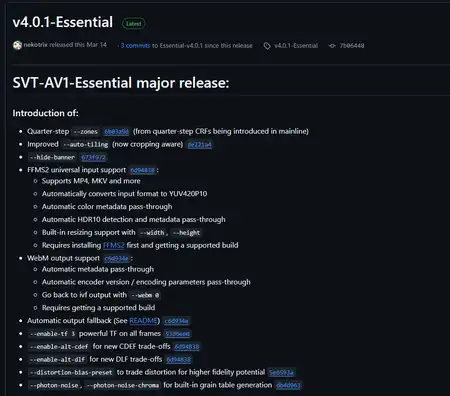
I found a good SVT-AV1 fork for high quality Anime encodes and made a DRAG&DROP windows batch script for it that includes SSIMULACRA2 scoring. I also…
I found a good SVT-AV1 fork for high quality Anime encodes and made a DRAG&DROP windows batch script for it that includes SSIMULACRA2 scoring.
I also compiled the fssimu2 project for windows otherwise you have to manually convert video frames to PNG and math out the average by hand.https://github.com/nekotrix/SVT-AV1-Essential/releases/tag/v4.0.1-Essential@echo off & setlocal set "input=%~1" & set "outbase=%~dpn1" & set "stfu=-hide_banner -loglevel fatal" set "av1base=--lookahead 32 --preset 4 --rc 1 --max-qp 60" set "psy=--ac-bias 0.5 --enable-dlf 3 --noise-adaptive-filtering 4" set "bt701=--color-primaries 1 --transfer-characteristics 1 --matrix-coefficients 1" echo Welcome to the mini Essential SVT-AV1 2 pass drag and drop encoder, SSIMULACRA2 included at the end :ASK set /p bitrate="Enter 2 pass kbps bitrate: " && set /a bitrate=bitrate 2>nul || goto ASK if %bitrate% LSS 1 (goto ASK) else if %bitrate% GTR 10000 goto ASK echo: ffmpeg %stfu% -i %input% -map 0:v:0 -pix_fmt yuv420p10le -f yuv4mpegpipe -strict -1 - | ^ SvtAv1EncApp-4.0.1-Essential-Windows_Optimized -i - %av1base% --tbr %bitrate% %psy% %bt701% --pass 1 -b temp1pass.ivf ffmpeg %stfu% -i %input% -map 0:v:0 -pix_fmt yuv420p10le -f yuv4mpegpipe -strict -1 - | ^ SvtAv1EncApp-4.0.1-Essential-Windows_Optimized -i - %av1base% --tbr %bitrate% %psy% %bt701% --pass 2 -b temp2pass.ivf ffmpeg %stfu% -i temp2pass.ivf -c:v copy -an -y "%outbase%_%bitrate%_kbps_2pass_essential-av1.webm" echo: && echo --- calculating SSIMULACRA2 score of "%outbase%_%bitrate%_kbps_2pass_essential-av1.webm" --- && echo: ffmpeg %stfu% -i %input% -pix_fmt yuv420p input.y4m && timeout /t 5 /nobreak ffmpeg %stfu% -i "%outbase%_%bitrate%_kbps_2pass_essential-av1.webm" -pix_fmt yuv420p output.y4m timeout /t 5 /nobreak && fssimu2 input.y4m output.y4m del temp1pass.ivf temp2pass.ivf svtav1_2pass.log input.y4m output.y4m && pause
https://github.com/gianni-rosato/fssimu2
Animated Webp: I made some progress optimizing animated Webp compression. Simple windows batch scripts for now as I improve with Bash. This takes Screenshot (X).png…
Animated Webp
I made some progress optimizing animated Webp compression. Simple windows batch scripts for now as I improve with Bash.
This takes Screenshot (X).png files and renames them to 01.png 02.png 03.png frames for ffmpeg processingThis scales the frames to 50% size and crops them to 540x540, assuming source is 1920x1080. Also exports them to a new png_444 folder.@setlocal EnableDelayedExpansion & set n=1 for %%f in (*.png) do ren "%%f" "!n:~ -2!.png" & set /a n+=101This converts the png_444 frames into an intermediate RGB video file, may not be necessary...@echo off & setlocal EnableDelayedExpansion mkdir png_444 & for %%f in (*.png) do ffmpeg -hide_banner -i "%%f" -vf "scale=iw/2:ih/2,crop=540:540:(iw-540)/2:(ih-540)/2" -y "png_444/%%~nf.png"ffmpeg -framerate 1 -i %%02d.png ^ -c:v libvpx-vp9 -cpu-used 4 -r 1 -g 1 ^ -b:v 0 -crf 0 -qmin 0 -qmax 0 -pix_fmt gbrp out.webm
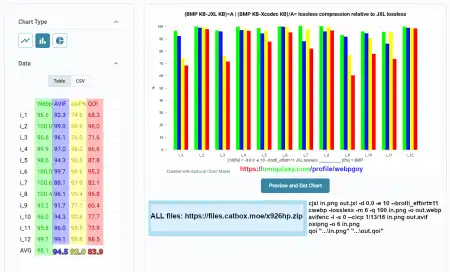
lossless Webp: >Relative to lossless JXL filesize, how close in compression does a given lossless image codec get? That's what I'm trying to answer here. A dozen co…
lossless Webp
>Relative to lossless JXL filesize, how close in compression does a given lossless image codec get?
That's what I'm trying to answer here. A dozen common type 1920x1080 PNG images were used.
JXL KB = 100% and BMP KB = 0%. Lossless JXL/Webp/AVIF/oxiPNG/QOI tested. Anything above 100% means JXL was defeated.(BMP KB-JXL KB)=A | (BMP KB-Xcodec KB)/A= lossless compression relative to JXL losslesscjxl in.png out.jxl -d 0.0 -e 10 --brotli_effort=11 cwebp -lossless -m 6 -q 100 in.png -o out.webp avifenc -l -s 0 --cicp 1/13/16 in.png out.avif oxipng -o 6 in.png qoi "...\in.png" "...\out.qoi"
ALL files: https://files.catbox.moe/x926hp.zip
No file
Technology Codex: Discussion for the Codex page Technology Codex. The Codex page is written by this board's curators, so other users cannot edit it. This thread is whe…
Technology Codex
Discussion for the Codex page Technology Codex.
The Codex page is written by this board's curators, so other users cannot edit it. This thread is where everyone else talks about it: post a reply if you have a question, spotted something out of date, or want to suggest what to add.
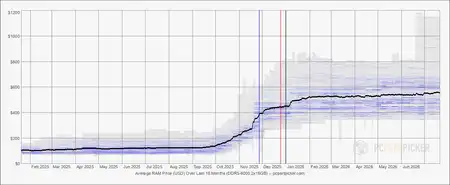
Ram prices: >DDR5-6000 2x16GB (Average price in USD over last 18 months) Source: https://pcpartpicker.com/trends/price/memory/#ram.ddr5.6000.2x16384 How long unt…
Ram prices
>DDR5-6000 2x16GB (Average price in USD over last 18 months)
Source: https://pcpartpicker.com/trends/price/memory/#ram.ddr5.6000.2x16384
How long until prices go down?
Technology: Welcome to the Technology board! For AI discussions please use the https://umigalaxy.com/explore/ai board
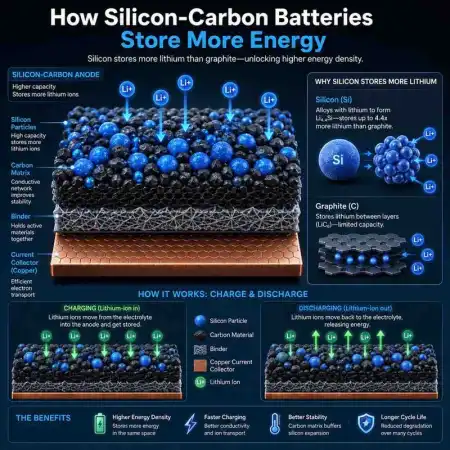
Silicon-Carbon batteries now mainstream: >uses an anode composite of silicon with a carbon matrix >silicon anode alone swelled 300% during charging, cracked itself apart >carbon matrix conta…
Silicon-Carbon batteries now mainstream
>uses an anode composite of silicon with a carbon matrix
>silicon anode alone swelled 300% during charging, cracked itself apart
>carbon matrix contain expansion better
>Si-C = ~1,000 charge/recharge cycles (potentially higher in the future)
>higher energy density, ~300 Wh/KG (potentially higher in the future)
>lower heat during charging (potential for faster charging)
https://www.androidauthority.com/samsung-first-phones-silicon-carbon-batteries-3689630/
https://phoneprice360.com/what-is-a-silicon-carbon-battery-phone-best-phones-using-it-in-2026/
0.99 SSIM H.264 vs AV1: I took the 73 Mbps 4K NLUUG Tears of Steel encode, scaled it to 720p, and used CRF 10 veryslow x264 to simulate 720p BD. SSIM cheating was disabled i…
0.99 SSIM H.264 vs AV1
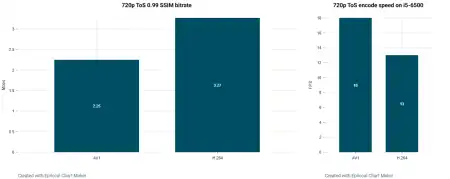
I took the 73 Mbps 4K NLUUG Tears of Steel encode, scaled it to 720p, and used CRF 10 veryslow x264 to simulate 720p BD.
SSIM cheating was disabled in AV1 with tune 0 and variance boost, 720p was chosen to handicap AV1's 128x128 superblocks.
Even when nearly maxing out x264 compression , preset 4 AV1 = ~30% better compression and encodes ~40% faster as well.
I confidently declare that H.264 is now official boomer trash like flickering CRT displays.ffmpeg -i tearsofsteel_4k.mov ^ -vf "scale=1280:720:force_original_aspect_ratio=decrease,pad=1280:720:(ow-iw)/2:(oh-ih)/2:black" ^ -c:v libx264 -preset veryslow -crf 10 -pix_fmt yuv420p input.mp4base_av1=ffmpeg -i input.mp4 -c:v libsvtav1 -crf 28 -preset 4 -pix_fmt yuv420p10le -svtav1-params psy_av1=keyint=5s:lookahead=120:tune=0:enable-variance-boost=1:variance-boost-strength=3:variance-octile=4frame=17616 fps= 18 Lsize= 212825KiB bitrate=2375.4kbits/s speed=0.73x elapsed=0:16:45.14base_h264=ffmpeg -i input.mp4 -c:v libx264 -crf 18 -preset veryslow -pix_fmt yuv420phttps://ftp.nluug.nl/pub/graphics/blender/demo/movies/ToS/tearsofsteel_4k.movframe=17616 fps= 13 Lsize= 304524KiB bitrate=3399.0kbits/s speed=0.535x elapsed=0:22:51.14
SSIM/AV1 script v2.1: I am 90% sure I have fixed my windows batch SSIM AV1 auto-encoder script. @echo off & setlocal enabledelayedexpansion & set "crf=60" & set "mincrf=20…
SSIM/AV1 script v2.1
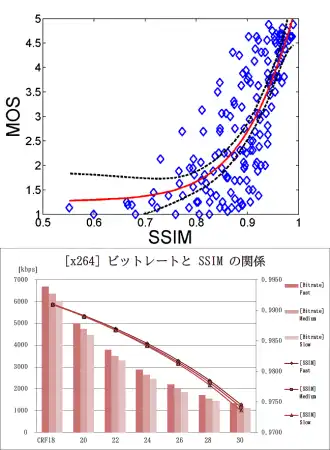
I am 90% sure I have fixed my windows batch SSIM AV1 auto-encoder script.@echo off & setlocal enabledelayedexpansion & set "crf=60" & set "mincrf=20" set "base_av1=-c:v libsvtav1 -preset 4 -pix_fmt yuv420p10le -svtav1-params" set "psy_av1=keyint=5s:lookahead=120:tune=0:enable-variance-boost=1:variance-boost-strength=3:variance-octile=4" set "opus=-c:a libopus -b:a 128k" & set "ffquiet=-hide_banner -loglevel quiet" echo Weclome to my auto-SSIM AV1 encoder, only input.mp4 accepted, choose desired SSIM: echo 1= 0.995 (autism quality) & echo 2= 0.990 (very high quality) & echo 3= 0.980 (high quality) choice /c 123 /m "Enter number option on keyboard: " if errorlevel 3 set ssim_target=980 if errorlevel 2 set ssim_target=990 if errorlevel 1 set ssim_target=995 echo: :loop ffmpeg !ffquiet! -i input.mp4 -crf !crf! !base_av1! !psy_av1! !opus! -y AV1_CRF-!crf!.webm 2>nul for /f "delims=" %%A in ('ffmpeg -nostdin -r 30 -i AV1_CRF-!crf!.webm -nostdin -r 30 -i input.mp4 ^ -filter_complex "[0:v]format=yuv420p10le[v0];[1:v]format=yuv420p10le[v1];[v0][v1]ssim" -f null - 2^>^&1 ^| findstr "All:"') do set "a=%%A" set "a=!a:*All:0.=!" & set "ssim=!a:~0,3!" & echo SSIM: 0.!ssim! @ CRF !crf! & echo: if !ssim! lss !ssim_target! (if !crf! gtr !mincrf! (del /s /q AV1_CRF-!crf!.webm >nul 2>&1 & set /a crf-=2 & goto loop) ) :end for %%Y in ("input.mp4") do set /a kb_mp4=(%%~zY+1023)/1024 & for %%Y in ("AV1_CRF-!crf!.webm") do set /a kb_webm=(%%~zY+1023)/1024 set /a saved_pct=(kb_mp4-kb_webm)*100/kb_mp4 & echo MP4= !kb_mp4! KB & echo AV1= !kb_webm! KB echo **** !saved_pct!%% filesize reduction achieved with AV1 **** pause
OHIO umigalaxy I noticed this place supports AV1, hope it's cool if I crosspost from 4chan's /g/ board. I present you a script that targets SSIM, onl…
OHIO umigalaxy
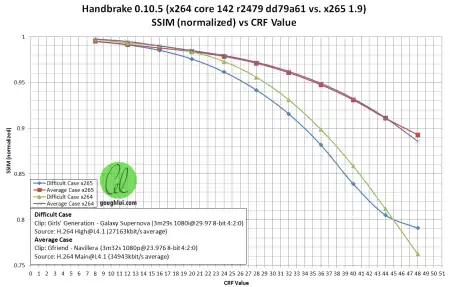
I noticed this place supports AV1, hope it's cool if I crosspost from 4chan's /g/ board. I present you a script that targets SSIM, only 1 input video file per folder though.1 problem: AV1 cheats in SSIM. It intelligently preserves the structure of video but destroys fine detail. However these disable SSIM cheating:@echo off & mkdir temp :loop set /p crf="CRF? (30-50 reccomended): " for %%f in (*.mkv, *.mp4, *.mov) do ( ffmpeg -i "%%f" -c:v libsvtav1 ^ -crf %crf% -preset 4 -pix_fmt yuv420p10le -svtav1-params ^ keyint=2s:lookahead=120:tune=0:enable-variance-boost=1:variance-boost-strength=3:variance-octile=4 ^ -c:a libopus -b:a 64k -y "%%f_CRF-%crf%_AV1.webm" echo: & echo SSIM result: ffmpeg -hide_banner -loglevel error -i "%%f" -c:v libx264 -pix_fmt yuv420p10le ^ -preset ultrafast -crf 0 -y temp/temp_source_2_10b.mkv ffmpeg -hide_banner -i "%%f_CRF-%crf%_AV1.webm" -i temp/temp_source_2_10b.mkv ^ -lavfi ssim -f null - 2>&1 | findstr "[Parsed_ssim" echo: ) goto looptune=0Prioritizes perceptual/visual qualityenable-variance-boost=1allocates more bits to low-contrast areas (such as skin, clouds, or foggy scenes) that typically suffer from blurring and artifacting in fixed-quantization encoding.variance-boost-strength=3Applies medium strength variance boost, enough to improve quality but not bloat bitrate.variance-octile=4Applies medium strength for the new 8x8 variance algorithm, which is used for adaptive quantization.
All of these not only give you better/accurate SSIM scores but allow AV1 to create subjectively medium to high quality AV1 encodes, not just compete in objective metric pissing contests.
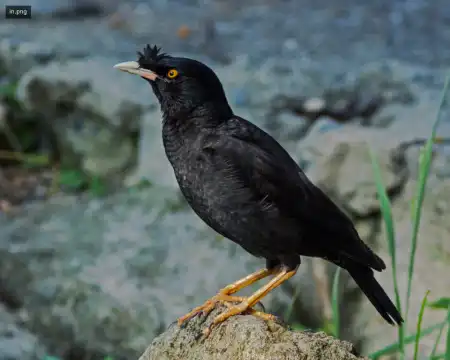
I love birds but high res images of them tend to be pretty bloated and not ideal for sharing. Noticed Webp uploads are allowed here and aren't furthe…
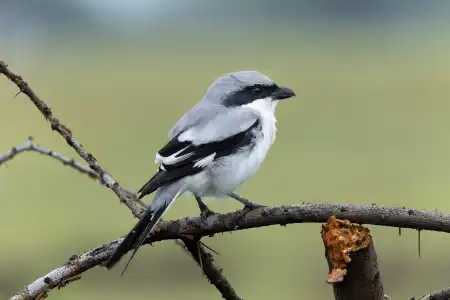
I love birds but high res images of them tend to be pretty bloated and not ideal for sharing.
Noticed Webp uploads are allowed here and aren't further compressed, very nice. Nice step up from ancient JPG.
I don't know too much about quality except that high quality SSIM scores are above 0.95 so I'm aiming for 0.96.
'cwebp -sharp_yuv -m 6 -mt -pass 4 -hint photo -size 540000 in.jpg -o out.webp' size=in bytes not KB
https://commons.wikimedia.org/wiki/File:Great_Grey_Shrike_in_Bhigwan_August_2025_by_Tisha_Mukherjee_02.jpg
I made a video tutorial of how to encode AV1: It's using Staxrip so not ffmpeg advanced but it does give you access to SVT-AV1-PSY + a few advanced options like maxing out frame lookahead, VQ tun…
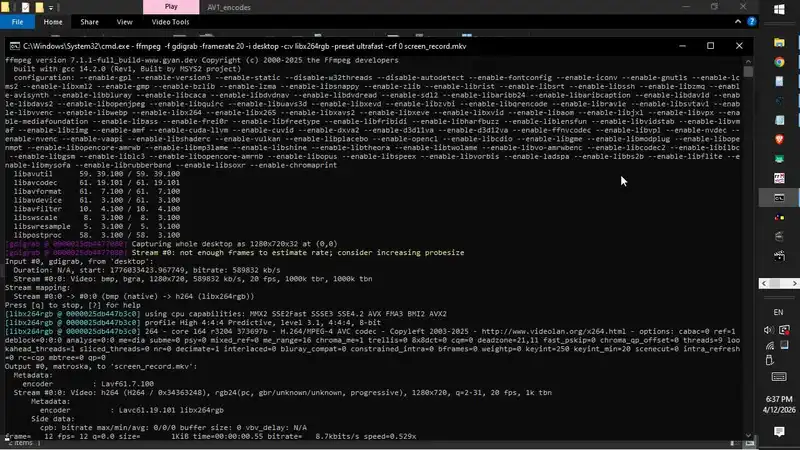
I made a video tutorial of how to encode AV1
It's using Staxrip so not ffmpeg advanced but it does give you access to SVT-AV1-PSY + a few advanced options like maxing out frame lookahead, VQ tune used by default.